Leave, Payslips and Policy Questions by Text: A No-Code iMessage AI Agent for HR Teams
See how a no-code iMessage AI agent can answer leave, payslip, policy and onboarding questions using live HR data, approved knowledge and clear access controls.

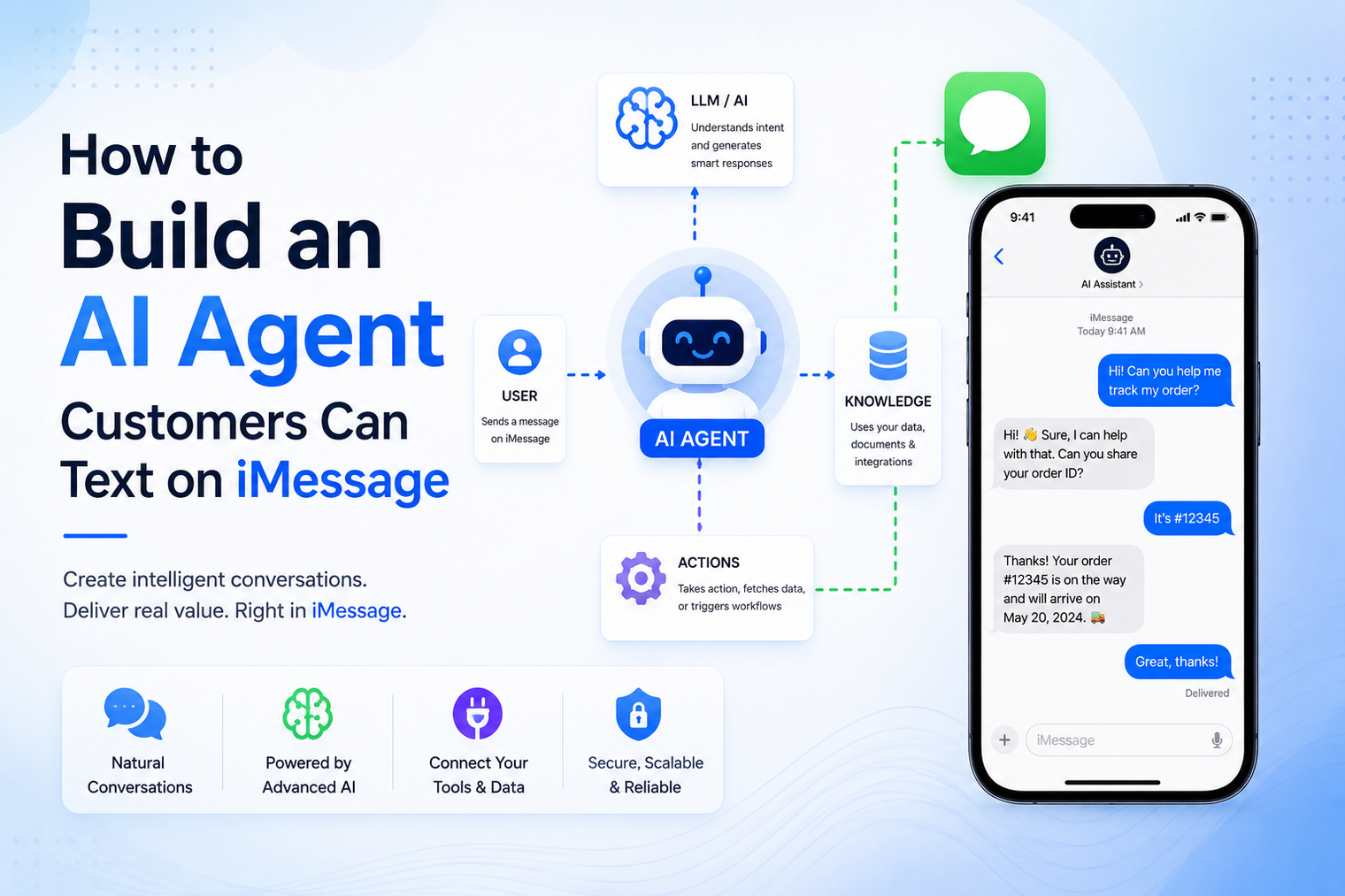
• An iMessage AI agent combines a messaging delivery layer with a model, instructions, business context and tools.
• Start with one narrow customer job instead of trying to build a general assistant.
• Ground the agent in approved knowledge and define what it must not invent.
• Use webhooks and queues so inbound messages, model calls and replies remain reliable.
• Human handoff, consent, privacy and evaluation are product requirements, not final-stage additions.
An AI agent does not need another mobile app to become useful. It can live inside a conversation customers already know how to start. A person texts a number, the agent understands the request, uses approved knowledge or tools, and replies in the same iMessage thread.
The apparent simplicity hides several product decisions. The team still needs a clear agent job, a messaging layer, a model, business knowledge, tool permissions, conversation state, safety rules and a path to a human. This guide explains how those parts fit together and how to move from a demo that answers questions to a reliable customer-facing workflow.
What is an AI agent for iMessage?
An AI agent for iMessage is software that receives a customer message, interprets the request, chooses an action and sends a response through an iMessage-enabled number. The intelligence may come from a large language model, retrieval system, rules engine or a combination of these components.
The agent is not the messaging network. A delivery platform connects the number and transports conversation events. Your product supplies the prompt, knowledge, memory, tools, policies and escalation logic. MessageBlue describes this separation on its AI agents for iMessage page, where teams can connect their preferred model or agent framework to the messaging channel.
This distinction gives product teams flexibility. The messaging provider can remain stable while the team changes models, improves retrieval, adds a scheduling tool or adjusts the agent behavior.
There are two practical ways to launch. The right choice depends on how much custom logic the workflow needs.
| Build path | Best fit |
|---|---|
| No-code agent builder | FAQ answering, lead qualification, information lines and simple onboarding based on prompts and uploaded knowledge. |
| Developer platform | Custom tools, databases, CRM actions, multi-step workflows, advanced memory, policy checks and specialized observability. |
A nontechnical team can begin with the MessageBlue no-code iMessage agent builder by choosing a model, writing instructions and adding business knowledge. When the use case needs custom services or deeper control, the team can use the developer platform and webhooks.
A customer-facing agent normally includes the following layers:
| Layer | What it does |
|---|---|
| iMessage delivery | Receives inbound messages and sends replies through an iMessage-enabled number. |
| Webhook and queue | Captures events, verifies them and moves longer work into reliable background processing. |
| Agent orchestrator | Combines instructions, context, memory, retrieval and tool selection. |
| Model | Interprets language and generates or structures a proposed response. |
| Knowledge and retrieval | Supplies approved business facts, policies, product information or help content. |
| Tools | Perform actions such as looking up an order, checking availability, creating a lead or scheduling. |
| Policy and handoff | Limits risky behavior and routes conversations to a person when required. |
| Observability | Records latency, errors, tool activity, escalation and quality outcomes. |
MessageBlue handles the messaging and supported event layer. The rest can live inside your application, agent framework or configured no-code workflow.
How to build an AI agent customers can text
A useful first agent is narrow. It might answer service questions, qualify an inbound lead, help a guest change a reservation or guide a customer through onboarding. A vague instruction such as “help customers with anything” creates unclear boundaries and makes testing difficult.
Define the success condition in operational terms. For a lead qualifier, success may mean collecting a name, service need, location and preferred callback time, then creating a CRM record. For support, it may mean resolving approved FAQs or handing the conversation to an employee with a concise summary.
Write the happy path, common variations and failure paths before choosing the model. Decide how the conversation starts, what information the agent needs, which questions it may ask, what actions it can take and how it closes the interaction.
Include interruptions. Customers change topics, send incomplete answers, reply hours later and ask for a person. The agent should recover without forcing them to repeat the entire conversation.
Model selection should follow the workflow, not a popularity ranking. Consider response quality, latency, cost, context limits, tool-calling behavior, supported languages and the level of reasoning required. A short FAQ agent may not need the same model as an assistant that compares policies and performs multi-step actions.
Use a model-agnostic architecture where practical. Your agent interface should accept a structured request and return a structured result, allowing the team to test or replace the underlying model without rewriting the messaging layer.
The prompt should define the agent role, permitted tasks, tone, source hierarchy, tool rules, escalation conditions and prohibited behavior. Personality matters, but operating boundaries matter more.
A strong instruction set might tell the agent to answer briefly, use only approved business information, ask one question at a time, confirm before creating a booking, never claim an unavailable discount and transfer to a person when the customer requests one or when confidence is low.
A model may produce fluent language without knowing the current facts of your business. Grounding supplies the relevant information at response time. Sources may include FAQs, policies, product documentation, pricing rules, approved website pages or structured database records.
Prepare the knowledge before uploading it. Remove outdated versions, resolve contradictions, label effective dates and separate public information from internal material. Retrieval quality depends on source quality. A clean, authoritative knowledge base reduces guessing and makes review easier.
Knowledge lets the agent answer. Tools let it do something. A tool might check appointment availability, retrieve an order, update a CRM, create a ticket or send a payment link. Each tool should have a narrow input schema, clear permissions and server-side validation.
Do not let the model directly perform a sensitive action without checks. Confirm the customer identity where appropriate, validate arguments, enforce business rules and require explicit confirmation before irreversible steps. Record the tool request and result for debugging and audit.
Conversation memory can include the current turn, recent messages, structured facts collected during the workflow and durable customer preferences. More memory is not automatically better. Irrelevant history increases cost, can confuse the model and may create privacy risk.
Store important facts in structured fields when possible. For example, save the selected appointment time as data instead of relying on the model to infer it from a long transcript. Define retention rules and avoid keeping sensitive content without a clear business and legal reason.
Register a secure webhook so each inbound message reaches your application. Verify the provider signature, store the event, deduplicate retries and place the agent job on a queue. The worker can then load the conversation, retrieve knowledge, call tools and ask the model for the next response.
Developers can use the MessageBlue iMessage API as the delivery layer for this pattern. Keep exact endpoint and payload details aligned with the current API reference during implementation.
A response that works in a web article may feel heavy in a text conversation. Keep the answer focused, use short paragraphs and ask one clear follow-up question when more information is needed. Do not send a wall of text simply because the model can generate one.
Typing indicators, reactions, images or voice notes can support the experience when the platform and use case allow them, but they should not distract from clarity. The customer should always understand whether the agent answered, took an action or needs more information.
Handoff is not an admission that the agent failed. It is how the system handles judgment, exceptions, emotional situations, sensitive decisions and customer preference. Define explicit triggers, including a direct request for a person, repeated misunderstanding, unsupported topics, low confidence or tool failure.
When escalating, send the employee a summary with the customer request, relevant facts, actions already attempted and the reason for handoff. Pause the automated agent while the human owns the thread. When automation resumes, make the transition deliberate.
The agent should identify the business clearly and communicate for an expected purpose. Do not use AI to disguise unsolicited mass outreach as personal conversation. MessageBlue terms prohibit spam and require customers to obtain necessary consents for data transmitted through the service.
Control access to message content, API keys, tools and logs. Redact unnecessary sensitive data before model calls where appropriate. For regulated or private workloads, evaluate deployment boundaries, retention, identity controls and key management. MessageBlue offers an enterprise iMessage infrastructure path for organizations that need private cloud, customer cloud or on-premises options.
Create a test set before launch. Include normal requests, ambiguous wording, spelling mistakes, missing information, long delays, repeated messages, unsupported requests, prompt-injection attempts, tool errors and direct requests for a human.
Measure more than whether the reply sounds good. Track task completion, factual accuracy, unnecessary questions, escalation quality, latency, tool success, duplicate responses and customer drop-off. Review real conversations with appropriate privacy controls and turn failures into new tests.
A guest texts, “Can I move my reservation to 8 tonight?” The webhook receives the message and the application identifies the restaurant, customer and current booking. The agent extracts the requested change and calls an availability tool.
If 8:00 p.m. is available, the agent asks for confirmation before updating the reservation. After the guest confirms, the tool changes the booking and the agent replies with the final time. If the requested slot is unavailable, it offers approved alternatives. If the reservation cannot be matched or the guest asks for a manager, the system hands the thread to staff with a summary.
The model handles language, but the reservation system remains the source of truth. The agent never invents availability or claims that a booking changed before the tool confirms it.
| Use case | What the agent should accomplish |
|---|---|
| Support FAQ agent | Answers approved routine questions and escalates exceptions with conversation context. |
| Lead qualification agent | Collects relevant details, answers initial questions and routes a qualified lead to the right person. |
| Product concierge | Uses catalog and policy knowledge to answer questions and recommend suitable options. |
| Onboarding assistant | Guides a new customer through setup, reminders and common help topics. |
| Reservation or scheduling agent | Checks availability, confirms changes and routes complex requests. |
| Founder or representative assistant | Handles routine inbound questions on a recognized number while preserving human control. |
• Giving the agent a broad mission with no measurable success condition.
• Allowing the model to answer from memory instead of approved business knowledge.
• Connecting powerful tools without validation, confirmation or access limits.
• Keeping an entire conversation history when only a few structured facts are needed.
• Sending long, web-style answers that do not fit a messaging conversation.
• Launching without an explicit human-handoff path.
• Evaluating only a few perfect examples instead of testing failures and edge cases.
• Treating the absence of a specific carrier registration process as permission to ignore consent and relevance.
MessageBlue acts as the iMessage infrastructure layer. It connects an iMessage-enabled number to the no-code builder or to a developer workflow through APIs and webhooks. Product teams bring the model, business rules, knowledge, tools and escalation logic, while MessageBlue handles supported message transport and events.
Teams can start with a prompt and knowledge base, then move into custom code as the agent needs databases, CRM actions or specialized policies. Where supported, the agent can also run on a number customers already recognize through MessageBlue bring-your-own-number workflows.
Pre-launch checklist for an iMessage AI agent
• The agent has one defined job and a measurable completion outcome.
• Approved knowledge sources are current, consistent and separated from internal-only material.
• Every tool has narrow permissions, server-side validation and clear confirmation rules.
• Webhook verification, queues, retries and duplicate-event handling have been tested.
• The response style is concise enough for a messaging conversation.
• A customer can reach a person, and automation pauses cleanly during handoff.
• Logs and dashboards expose failures without recording unnecessary sensitive data.
• Consent, identification, retention and privacy requirements have been reviewed for the use case.
Begin with one customer job and one measurable outcome. Connect the messaging path, ground the answers, limit the tools, test difficult conversations and make human support easy to reach. Once that workflow is reliable, add new capabilities deliberately.
Explore MessageBlue AI agents for iMessage or build a prompt-based agent with the no-code builder.
No separate agent app is required when the experience is delivered through iMessage. The customer begins by texting the connected number in the Messages app.
Yes, for suitable workflows. A no-code builder can combine a selected model, instructions and business knowledge. Custom tools and complex workflows usually require developer integration.
Choose based on the task, quality, speed, cost, context and tool requirements. A model-agnostic architecture makes it easier to compare options and change later.
Ground it in approved documents, FAQs, URLs or structured data. Retrieval should supply the relevant facts for each response instead of relying on the model to know current business information.
Yes, when your application exposes secure tools for those actions. Validate inputs, enforce permissions and require confirmation for sensitive or irreversible changes.
The agent should ask a focused clarification question or hand the conversation to a person. It should not invent facts to avoid admitting uncertainty.
That depends on the platform and line. MessageBlue promotes supported workflows that make existing numbers programmable while allowing normal manual texting.
Use narrow permissions, approved knowledge, webhook security, tool validation, data-minimization rules, test cases, monitoring and human escalation. Safety depends on the full system, not only the prompt.
Connect any LLM to a real blue-bubble number and go live in minutes.
Deploy an Agent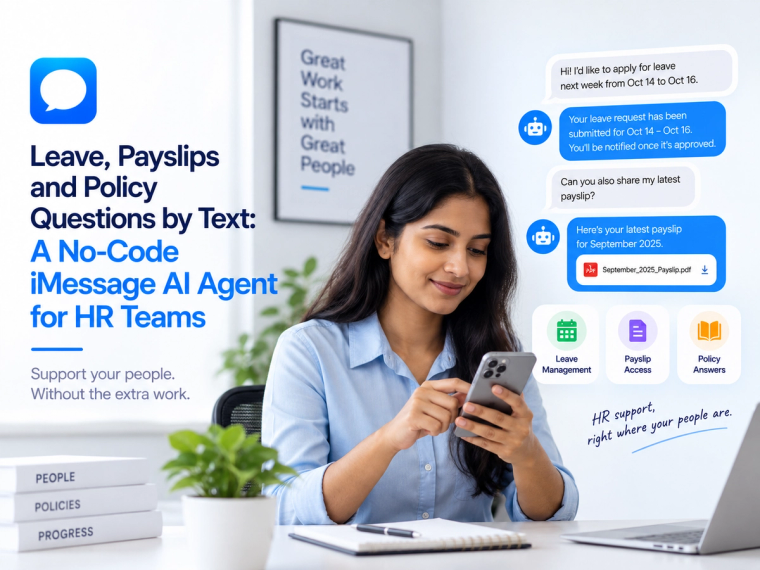
See how a no-code iMessage AI agent can answer leave, payslip, policy and onboarding questions using live HR data, approved knowledge and clear access controls.
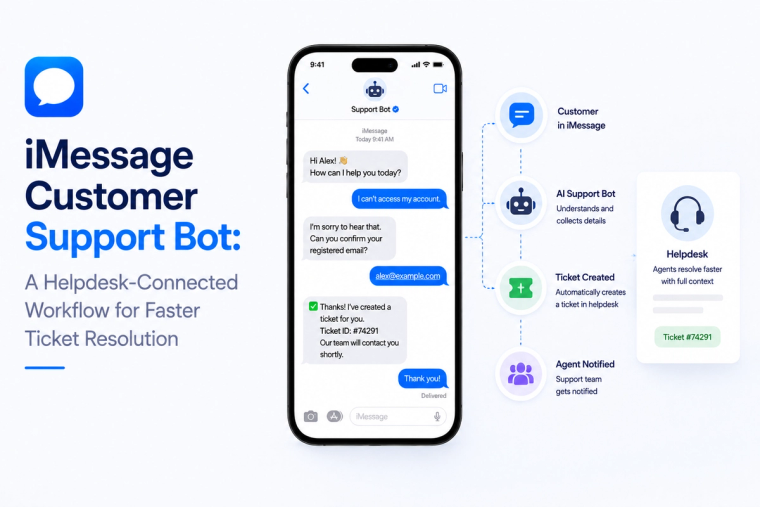
Design an iMessage customer support bot that reads helpdesk data, creates tickets, handles status questions and escalates complex cases with full conversation context.
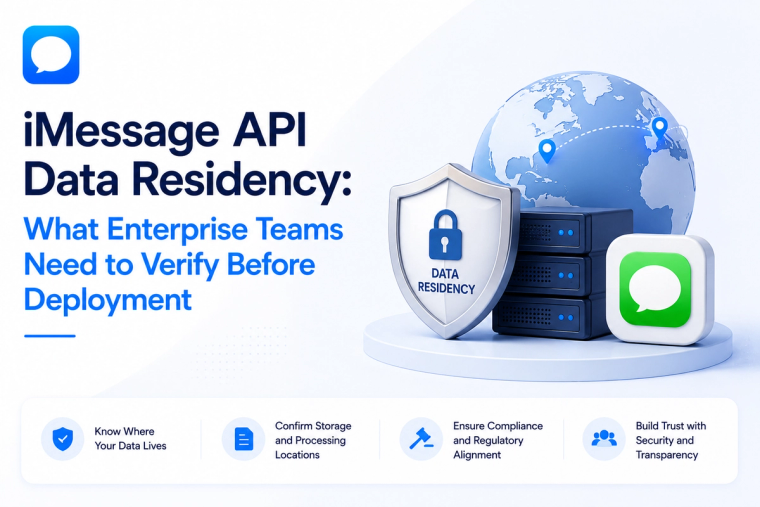
Evaluate iMessage API data residency across message content, logs, backups, keys, model providers, integrations and deployment boundaries before enterprise rollout.