Leave, Payslips and Policy Questions by Text: A No-Code iMessage AI Agent for HR Teams
See how a no-code iMessage AI agent can answer leave, payslip, policy and onboarding questions using live HR data, approved knowledge and clear access controls.
· Start with the product job you want messaging to complete, not with a list of channel features.
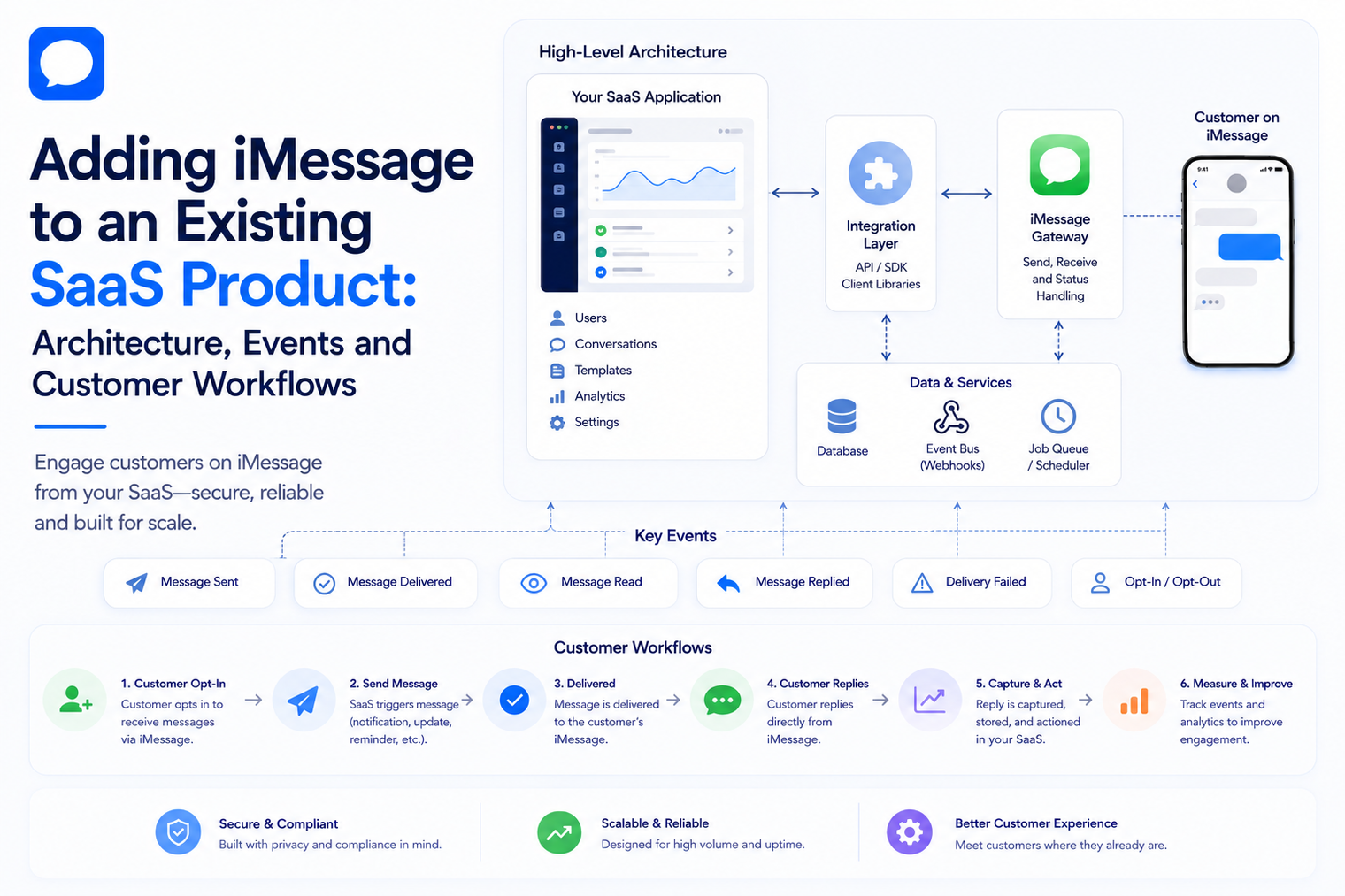
· Create a messaging domain layer between your SaaS modules and the external provider so transport details do not spread across the codebase.
· Model inbound replies as product events that can update records, call workflows, start an AI action or request a human response.
· Design tenant isolation, number ownership, permissions and data retention before you let multiple customers use the feature.
· Launch one narrow workflow first, instrument it heavily, then expand to richer automation after the event model proves reliable.
Adding a messaging channel to an established SaaS product can look deceptively small on a roadmap. The first prototype sends a message from a test screen. The production feature is much larger. It needs tenant boundaries, permissions, conversation state, inbound events, retries, auditability, feature entitlements, routing rules and a clear answer to what the product should do when a customer replies.
The safest approach is to treat two-way iMessage API access as infrastructure beneath your product, not as a separate mini-application. Your SaaS remains responsible for business state and customer experience. The messaging layer provides transport and events.
The phrase "add iMessage" can hide several different product goals. A logistics SaaS may want delivery updates. A CRM may want sales follow-up. A support platform may want ticket replies. A scheduling product may want appointment changes. An AI product may want customers to converse with an agent without opening a new app.
These goals share transport, but they do not share business logic. The first design step is to define the job the conversation should complete and the system of record that decides what is true.
| SaaS product goal | System of record | What the message should do |
|---|---|---|
| Order or status updates | Order, shipment or operations database | Notify the customer and route questions back to the correct record. |
| Sales follow-up | CRM and opportunity data | Continue a known sales conversation and record the reply. |
| Support | Ticketing or customer success system | Answer routine questions, create or update a case, and escalate when needed. |
| Scheduling | Calendar or booking system | Offer valid options, confirm changes and keep appointment state synchronized. |
| AI product experience | Agent runtime plus approved tools and data | Interpret the request, use tools and return a response in the same thread. |
A maintainable integration separates responsibilities. That makes failures easier to diagnose and prevents every product team from calling the messaging provider directly.
A business event starts the workflow. Examples include order.shipped, demo.completed, ticket.updated, invoice.overdue or appointment.reminder_due. The trigger should carry an internal record ID and tenant ID, not only a phone number and a text string.
This keeps messaging connected to product state. If the customer replies three hours later, the application can reopen the correct order, lead, ticket or booking instead of guessing from message content.
Create one internal service that accepts product-level commands such as send_status_update, request_confirmation or send_follow_up. This service chooses templates, checks consent and feature entitlements, resolves the sending number and records the outbound intent before calling the provider.
The rest of the SaaS should not need to know whether the transport client uses a REST request, an SDK or a future implementation. That decision stays inside the messaging service.
The provider adapter converts your internal command into the provider request and maps the response back into your own status model. Store the provider message ID, but do not make it the primary identifier used throughout the product. Your internal IDs should remain stable even when provider behavior changes.
Inbound replies and supported status events arrive asynchronously. Verify the webhook, persist the raw event or a privacy-safe representation, deduplicate it and acknowledge quickly. Then publish an internal event for slower processing.
This queue boundary protects the endpoint from CRM slowness, AI latency, database contention and temporary failures. It also gives you a place to retry product work without asking the provider to redeliver the original event.
The router decides what an inbound message means in product context. It should identify the tenant, conversation, customer, sending number and active workflow. Then it can route the reply to a deterministic rule, an AI agent, a human queue or another product module.
The final action belongs to your SaaS. Update the opportunity. Change the booking. Reopen the ticket. Create a task. Ask for missing data. Notify an employee. Messaging is complete only when the business state reaches the next valid step.
A common integration mistake is to store only outbound message text and delivery status. That is not enough for a two-way product. You need a conversation model that can connect messages to tenants, users, business records and workflow ownership.
| Entity | Useful fields | Why it matters |
|---|---|---|
| Conversation | tenant_id, contact_id, number_id, status, owner, last_activity_at | Defines the stable thread your product can reason about. |
| Message | internal_id, provider_id, direction, channel, created_at, status | Separates your application identity from provider identity. |
| Business link | entity_type, entity_id, relationship | Connects the thread to an order, lead, ticket, booking or account. |
| Workflow state | workflow_type, step, paused, next_action_at | Prevents overlapping automations and supports scheduled follow-up. |
| Consent state | purpose, source, recorded_at, opt_out_at | Supports responsible communication and product policy. |
| Ownership | automation, agent, user_id, handoff_reason | Prevents the AI and a human from responding at the same time. |
In a single-company application, a phone number can be a global configuration value. In SaaS, every number, credential, conversation, template and workflow must belong to the correct tenant. A webhook may arrive with only provider identifiers, so your system needs a fast and reliable mapping back to tenant context.
If private deployment or strict data boundaries are part of the roadmap, design for them before message data becomes deeply coupled to shared infrastructure.
Security-sensitive SaaS teams can evaluate a private iMessage API deployment path when customer-controlled cloud, VPC or on-premises architecture is required.
The most valuable part of business iMessage automation is not the outbound send. It is what happens next. An inbound reply should be converted into an event your product understands, just like a form submission, payment update or ticket change.
That final rule is important. A SaaS product should not tell the customer that an appointment changed, a refund started or a ticket was closed until the authoritative system confirms the action.
AI can improve natural-language understanding, summarization, routing and response generation, but it should not replace deterministic product state. Use the model to interpret what the customer wants, then let approved tools and business rules decide what can happen.
For products where the conversation itself is the interface, an AI agent over iMessage can sit between the webhook event and your SaaS tools. The model can ask clarifying questions, choose a permitted tool and summarize context, while your product remains the source of truth.
A SaaS platform must decide whether customers use numbers provisioned for the product, existing numbers they already operate, or a combination. This affects onboarding, identity, support, billing and migration.
For use cases where the business wants to keep a line customers already recognize, MessageBlue publishes a use existing number for iMessage API workflow that supports programmatic sends, inbound routing and continued manual texting on the same line.
If your SaaS exposes number configuration to customers, make ownership and lifecycle explicit. Define who can connect a number, what happens when an employee leaves, how the number is disconnected, what data remains visible and how active conversations are handled during migration.
SaaS teams often want messaging to connect with CRMs, calendars, commerce platforms, help desks and internal tools. The architecture should distinguish between platform synchronization and actions an agent performs during a conversation.
MessageBlue currently maintains an iMessage integrations directory covering CRM, calendar, support, commerce and other business systems. For your own product, decide whether the integration belongs in your SaaS, in the messaging platform, or behind a tool interface called by an agent.
The decision should follow data ownership. If your SaaS is the system of record for customer state, keep the canonical integration there. If messaging only needs a narrow lookup or action, a provider-side connector may reduce work. Avoid duplicating synchronization in two places without a clear source of truth.
| Failure | What can go wrong | Design response |
|---|---|---|
| Provider timeout | Your request may have succeeded even though your application did not receive a response. | Use idempotency, reconcile message state and avoid blind customer-visible retries. |
| Duplicate webhook | The same reply may be delivered more than once. | Deduplicate by event ID before triggering business actions. |
| Out-of-order events | Status or reply events may not arrive in the sequence you expect. | Use timestamps and state transitions that tolerate reordering. |
| Tenant mapping failure | An inbound event cannot be matched safely to a customer account. | Quarantine the event and alert operations instead of guessing. |
| Downstream outage | CRM, calendar or AI service is unavailable. | Queue the work, retry safely and give humans visibility into stuck conversations. |
| Human and automation collision | A rep responds while the workflow is preparing another message. | Use ownership state and sequence pause rules. |
| Unsupported request | The customer asks for something the workflow cannot safely complete. | Explain the limitation and route to a person or supported path. |
Pick a low-risk use case such as a status update or appointment reminder. Store every send, receive every reply and route unexpected responses to a human. The goal is to prove tenant mapping, message state and operational visibility.
Add narrow reply handling such as YES to confirm, a scheduling choice or a request for a known document. Keep actions reversible and easy to audit.
Connect the conversation to existing product workflows. Update records, notify owners, pause sequences and schedule the next step. At this point the channel becomes a real SaaS feature rather than a notification pipe.
Introduce an agent for requests where natural language genuinely reduces friction. Start with limited tools and known knowledge sources. Track escalation rate, tool success and false confirmations, not only message volume.
· Delivery success by channel and tenant.
· Inbound reply rate for workflows where a reply is expected.
· Time from inbound message to first useful action.
· Workflow completion rate, such as booking confirmed or ticket resolved.
· Human handoff rate and time to human response.
· Duplicate event rate and retry volume.
· Provider and downstream error rates.
· Opt-out or complaint signals for proactive messaging use cases.
· Support tickets related to number ownership, missing threads or incorrect routing.
These metrics are more useful than counting how many messages were sent. A SaaS feature succeeds when it advances a product workflow reliably and creates less friction for customers and operators.
The strongest SaaS integration does not look like a messaging feature bolted onto the side. It feels like another way to complete the same product workflows customers already understand. A reply updates the right record. A human sees the same context. An automation pauses when ownership changes. The message is only the interface.
Build around events, tenant boundaries and systems of record first. Then let programmable iMessage carry those workflows into a conversation. That architecture gives you room to add richer automation, existing numbers, AI and private deployment later without turning the rest of the SaaS into messaging-specific code.
No. The cleaner approach is usually to add a messaging domain service and provider adapter beside your existing modules. Product systems continue owning orders, leads, tickets and bookings.
That depends on the product and operating model. Dedicated numbers simplify ownership and routing, while existing-number models can preserve customer familiarity. Define lifecycle, billing and permissions before choosing.
Yes. Convert the webhook into an internal event, attach tenant and business context, then publish it into the same workflow infrastructure used by other product events.
Store the minimum information your product needs for continuity, support and audit according to your privacy and retention requirements. Do not depend on a provider dashboard as the only record of business state.
No. Many valuable workflows are deterministic. AI is most useful when customers use varied natural language, need answers from knowledge or require flexible routing. Add it where it improves the job, not because the channel supports it.
Test tenant isolation, invalid numbers, duplicate webhooks, endpoint downtime, out-of-order events, opt-outs, human takeover, downstream failures and disconnect or migration scenarios. Run a small cohort before general availability.
Connect any LLM to a real blue-bubble number and go live in minutes.
Deploy an Agent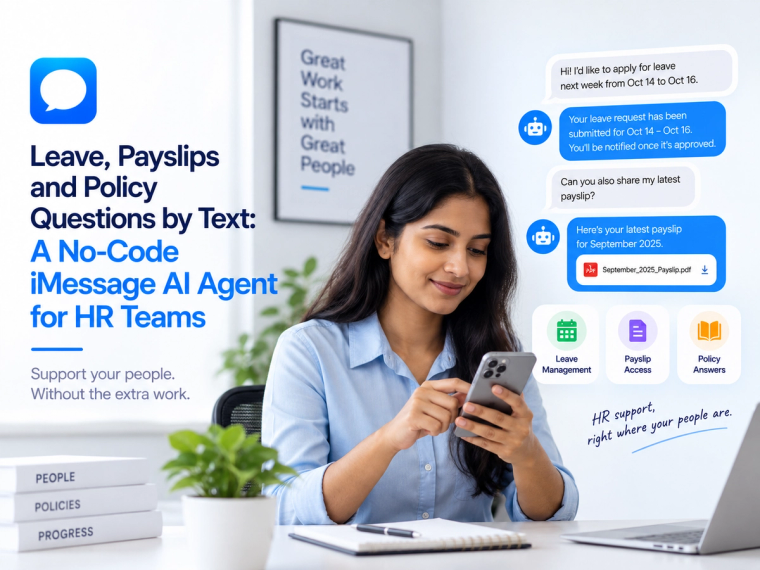
See how a no-code iMessage AI agent can answer leave, payslip, policy and onboarding questions using live HR data, approved knowledge and clear access controls.
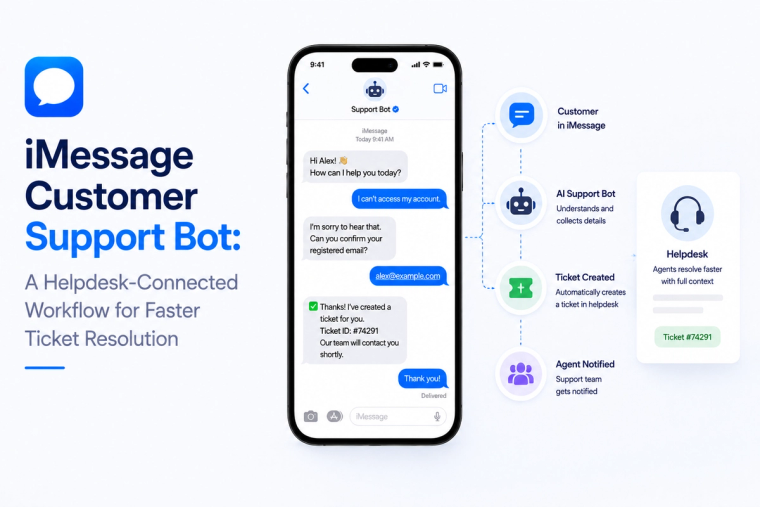
Design an iMessage customer support bot that reads helpdesk data, creates tickets, handles status questions and escalates complex cases with full conversation context.
Evaluate iMessage API data residency across message content, logs, backups, keys, model providers, integrations and deployment boundaries before enterprise rollout.