Best iMessage API for Business: 2026 Comparison
MessageBlue vs SendBlue vs LoopMessage vs BlueBubbles — an honest breakdown of the iMessage API landscape, and how to pick the right one for reliability, spam protection and enterprise isolation.
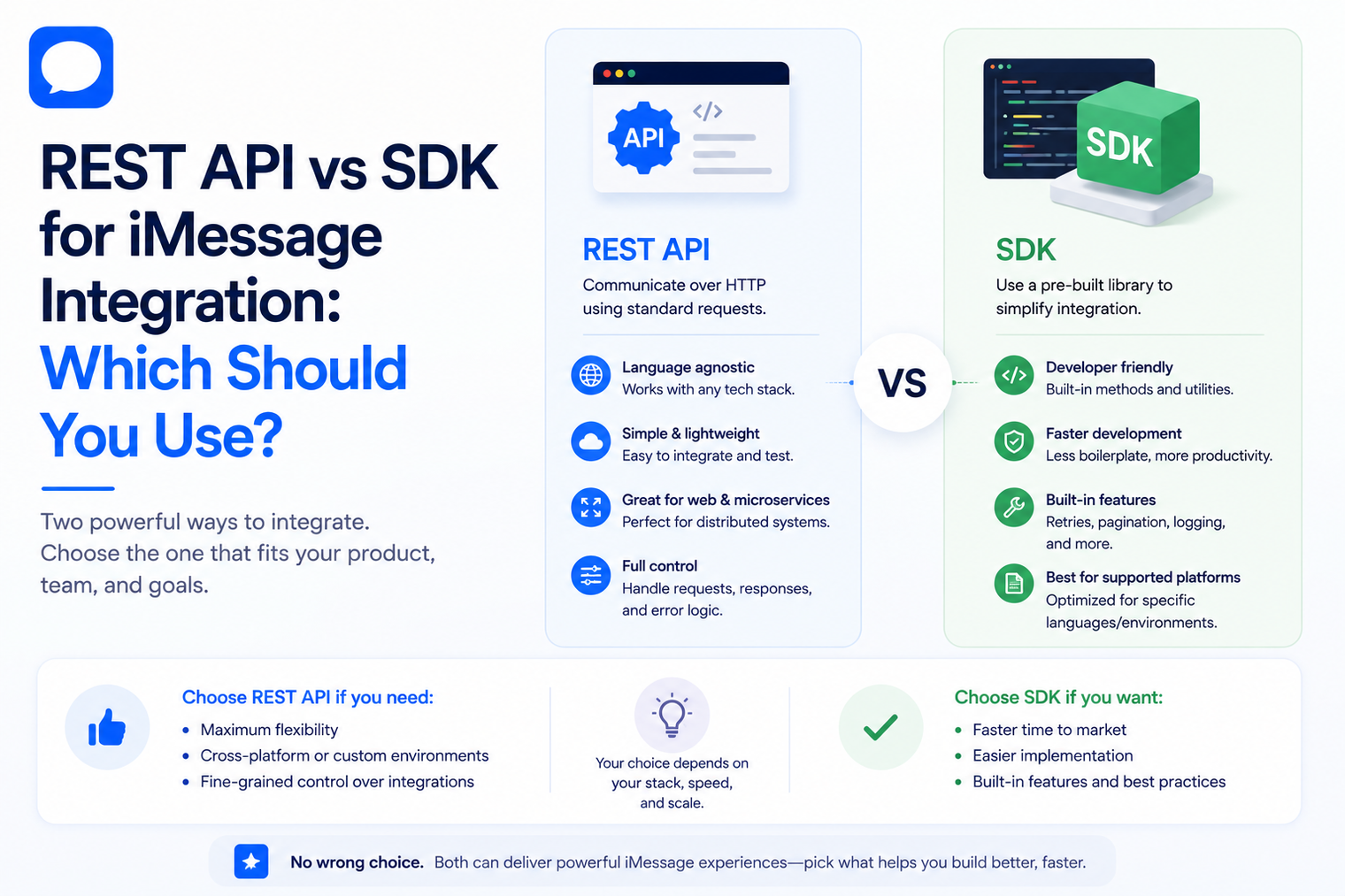
When a product team decides to add iMessage, the first architecture question is often not whether an API exists. It is how the application should call it. A direct REST integration gives engineers explicit control over HTTP requests, authentication, payloads and errors. An SDK wraps some of that work in language-native methods and objects. Both can be correct. The better choice depends on the product, the team and how much abstraction you want between your code and the messaging service.
For MessageBlue, the current developer product is built around programmatic two-way messaging, webhooks, SDKs, logs and a sandbox. Teams evaluating an iMessage API for developers should treat REST versus SDK as an application design decision, not as a contest where one interface must win everywhere.
Choose REST when explicit protocol control is more valuable than convenience. Choose an SDK when a maintained language wrapper reduces implementation friction without hiding behavior your team needs to debug.
That distinction matters because a messaging integration rarely stays limited to one send call. Production systems must receive replies, correlate conversations, handle duplicate events, recover from temporary failures, manage numbers and connect messages to business actions. The interface you choose affects how clearly those responsibilities appear in your code.
A REST API exposes messaging operations through HTTP endpoints. Your application constructs a request, adds authentication, serializes the payload, sends it over HTTPS and interprets the response. The application can use any language or runtime that can make HTTP requests.
This is the lowest common denominator for server-side integration. It is easy to inspect with tools such as curl, API clients, reverse proxies and standard HTTP logs. It also makes provider behavior visible. Status codes, headers, response bodies and timeouts are not translated through another library before your application sees them.
An SDK is a language-specific library that wraps API operations in functions, classes or typed objects. Instead of manually building every HTTP request, the application calls methods that handle common details such as base URLs, request serialization and response parsing.
The value of an SDK is not that it changes what the messaging platform can do. The value is developer ergonomics. It can make authentication setup clearer, reduce boilerplate, provide types or autocomplete, and create consistent patterns across a team that already works in the supported language.
| Decision area | Direct REST API | SDK |
|---|---|---|
| Initial setup | More request plumbing is visible and must be configured explicitly. | Usually faster when the library matches the team's language and framework. |
| Control | Full control over HTTP behavior, headers, serialization and transport settings. | Control depends on what the library exposes or allows you to override. |
| Debugging | Raw requests and responses are straightforward to inspect. | May require looking through library logs or source when behavior is abstracted. |
| Portability | Works from almost any runtime with an HTTP client. | Best fit for languages and versions the provider actively supports. |
| Type safety | You define your own types or validation. | Can provide typed request and response models. |
| Upgrade surface | You manage endpoint and schema changes directly. | You manage both API changes and SDK version changes. |
| Testing | Simple to mock at the HTTP boundary. | May offer test helpers, but you should still test provider-facing behavior. |
| Learning curve | Requires understanding the API contract immediately. | Can make the first integration easier, but underlying API knowledge is still important. |
If your production stack is already well supported by a maintained SDK, using it can remove repetitive code without introducing an unfamiliar dependency. If you use a less common runtime, an edge environment or a polyglot architecture, HTTP may be the more durable interface.
Do not choose a language just because an SDK exists. The messaging layer should fit the application architecture, not force the application to reorganize around a client library.
Some teams want a thin integration where every outbound request is obvious. Others prefer a higher-level client that makes sending, replying and media operations read like ordinary application code. Neither preference is inherently more professional. The important question is whether the abstraction remains transparent during failures.
If an SDK converts several provider errors into one generic exception, the convenience may become expensive during incident response. If it preserves useful identifiers, error details and response metadata, it can improve both readability and operations.
Messaging is an external dependency, so tracing should cross the provider boundary. Record your own request identifier, provider message identifier, conversation identifier, result, duration and retry state. Avoid logging message content unless it is necessary and permitted by your privacy model.
With direct REST calls, these fields are usually available at the same boundary where the HTTP request is made. With an SDK, confirm that hooks, return values or exceptions expose enough information to build the same trace. Convenience should not create a blind spot.
The REST versus SDK choice usually affects outbound actions more than inbound event delivery. Webhooks arrive at an HTTP endpoint regardless of how the application sends messages. That means the webhook handler should remain independently designed for verification, durable storage, deduplication and fast acknowledgement.
A team may use an SDK to send messages and still process every inbound event through its own web framework. This separation is often healthy because inbound messaging is an event-processing problem, not merely the reverse of a send request.
If iMessage becomes a core product channel, isolate provider-specific logic behind an internal interface. Your business services should ask for actions such as send_message, add_reaction or fetch_delivery_state without knowing how the provider client constructs HTTP calls.
This adapter pattern does not mean you expect to switch vendors. It prevents messaging transport details from leaking into billing, CRM, support, AI or product modules. It also makes provider API upgrades easier to test.
Direct REST integrations depend mainly on the published API contract. SDK integrations add a library version to your dependency graph. That can be a benefit when the provider ships fixes quickly, but it also means your team needs a policy for version pinning, changelog review and regression testing.
For long-lived products, ask whether your engineering team prefers to own a small HTTP client or delegate that maintenance to the provider SDK. The answer may differ between a startup prototype and a platform expected to operate for years.
Authentication secrets should be stored in the same managed secret system whether you use REST or an SDK. The client library should never encourage hardcoded credentials. Confirm how proxies, private networking, certificate requirements and audit logging fit into your deployment model.
Teams with stricter infrastructure requirements should evaluate the enterprise iMessage API architecture at the same time as the client interface. A convenient SDK does not answer questions about data residency, private networking or where the messaging stack runs.
A mature application does not need to make one global choice. It can use each interface where it creates the clearest boundary.
This pattern keeps the integration readable without making the SDK the center of the application. If the team later needs a direct REST call for an operation the SDK has not yet exposed, that call can stay behind the same internal adapter.
An AI product may use an SDK to send replies while the application receives inbound messages through webhooks, loads customer context and routes the text to its model and tools. Teams building an AI agent over iMessage should keep model prompts and tool permissions outside the messaging client so the transport layer cannot accidentally become the policy layer.
A SaaS platform may prefer a direct REST adapter if it needs precise control over tenant headers, request correlation, rate handling and provider error mapping. The rest of the product can call a stable internal messaging service regardless of how the provider connection is implemented.
A revenue application can pair an SDK with a programmable iMessage number workflow. The application decides when a follow-up is allowed, which representative owns the thread and when automation must pause. The messaging client only carries out the approved send or receives the resulting event.
| Mistake | Why it creates problems | Better approach |
|---|---|---|
| Choosing the shortest demo code | A five-line sample does not show retries, errors, webhook handling or production ownership. | Evaluate the full conversation lifecycle. |
| Importing the SDK across the entire codebase | Provider types and methods become difficult to change or test. | Contain the client behind an internal messaging adapter. |
| Assuming an SDK handles idempotency for you | A network retry can still cause duplicate business actions. | Store event IDs and define idempotent application behavior. |
| Treating REST as automatically more reliable | Reliability depends on your implementation and the provider infrastructure. | Measure end-to-end behavior under failure. |
| Treating SDKs as black boxes | Hidden behavior becomes painful during incidents. | Read the API contract and preserve low-level observability. |
The right iMessage integration is not the one with the fewest lines of code. It is the one your team can operate, debug and evolve without losing control of the customer conversation. REST gives explicit protocol ownership. An SDK can give cleaner application code. A hybrid approach often delivers both.
Start with the MessageBlue developer API, test both calling patterns in your stack, and keep the transport behind a small internal boundary. That gives your product room to grow from a simple notification to a durable two-way workflow without rewriting the rest of the application.
An SDK can reduce development time, but the network path still reaches the same provider service. Application performance depends on request handling, provider latency, retries and downstream work, not on the presence of a wrapper alone.
Yes. Many teams use an SDK for common operations and direct HTTP for unsupported or specialized actions. Keep both behind the same internal interface so the rest of the product stays consistent.
No. Webhooks are HTTP requests delivered to your endpoint. You can process them with your existing web framework, verify them, store them and then use either REST or an SDK for any response.
Either can work. Direct HTTP keeps dependencies small, while a lightweight SDK can improve readability. Check package size, cold-start impact, runtime support and timeout behavior in your environment.
Usually only if you have specific requirements the SDK does not meet. A thin internal adapter around the provider SDK often gives enough control without recreating authentication, serialization and error handling from scratch.
Connect any LLM to a real blue-bubble number and go live in minutes.
Deploy an AgentMessageBlue vs SendBlue vs LoopMessage vs BlueBubbles — an honest breakdown of the iMessage API landscape, and how to pick the right one for reliability, spam protection and enterprise isolation.
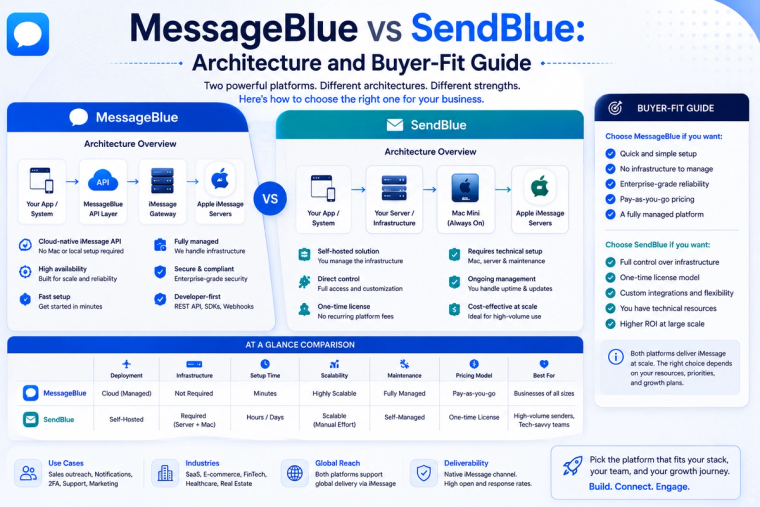
Compare MessageBlue and SendBlue across AI agents, APIs, CRM workflows, number options, enterprise deployment and pricing. Choose the right iMessage platform for your use case.
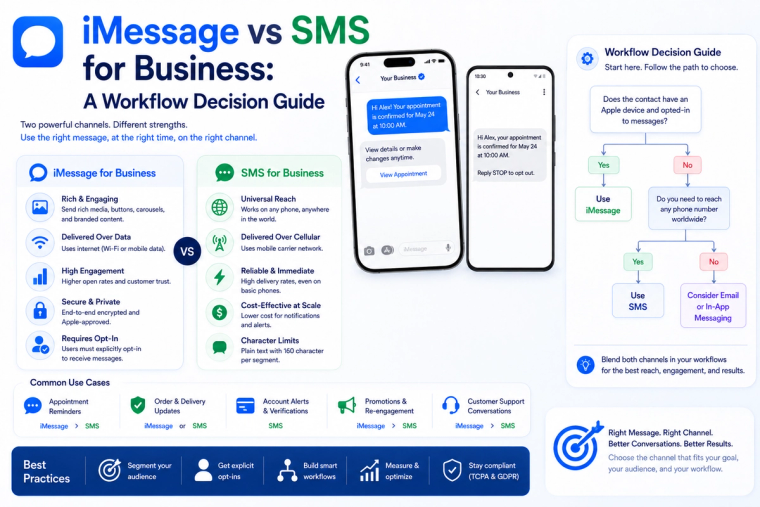
Compare iMessage and SMS for business messaging across reach, automation, customer experience, compliance, fallback and cost. Choose the right channel for each workflow.